Table of Contents
Start of script
The panel of debugging in the script editor
The most convenient way to run scripts is to use the script player panel.

To run the script, click the button with the green triangle icon.
The debug menu
Scripts can be run using the debug menu.
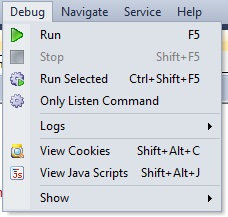
Menu item Run runs the script for execution.
If you want to run only part of the script, you can use the menu item Execute the selected.
Keyboard shortcuts
You can also run the script using the F5 hotkey.
If you want to run part of the script, you can use the keyboard shortcut Ctrl+Shift+F5.