Table of Contents
Start of script
Studio Version
The debug menu
Scripts can be run using the debug menu.
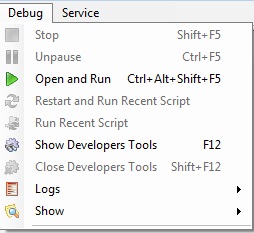
Menu item Open and Run starts the script for execution, the path to which you specify through the file selection dialog.
Keyboard shortcuts
You can also use the hotkey combination Ctrl+Alt+Shift+F5.
XHE version with built-in IE
File Menu

The initial launch of scripts in XHE RT with IE is performed using the File menu:
- The menu item Open starts the selected script for execution.
- The menu item Restart Last Opened Script restarts the last script that was run in the program.
- The menu item Restart XHE and Last Opened Script restarts the program and executes the last script that was run before exiting.
The debug menu
Scripts can be run again using the Debug menu.

The Continue menu item starts the last script that was executed again.
Keyboard shortcuts
You can also use the F5 hotkey to restart the last one that was started.